 undergroundwires
e72c1c13ea
undergroundwires
e72c1c13ea
This commit unifies the way the files are being deleted by introducing
the `DeleteFiles` function. It refactors existing scripts that are
deleting files to use the new function, to improve their documentation
and increase their safety.

Script changes:

- 'Clear Software Reporter Tool logs':
  - Rename to: 'Clear Google's "Software Reporter Tool" logs'
- 'Clear credentials in Windows Credential Manager':
  - Migrate code to PowerShell, removing the need to delete files.
  - Improve error messages and robustness of the implementation.
- 'Clear Nvidia residual telemetry files':
  - Extract to two scripts for more granularity and better
    documentation:
      1. 'Disable Nvidia telemetry components'
      2. 'Disable Nvidia telemetry drivers'
  - Change the logic so instead of clearing directory contents and
    deleting drivers, it conducts a soft delete for reversibility to
    prioritize user safety.
- 'Remove OneDrive residual files':
  - Improve documentation
- 'Clear primary Windows telemetry file':
  - Rename to 'Clear diagnostics tracking logs'.
  - Add missing file paths seen on modern versions of Windows.
  - Add more documentation.
- 'Clear Windows Update History (`WUAgent`) system logs':
  - Rename to 'Clear Windows update files'.
  - Add more documentation.
- 'Clear Cryptographic Services diagnostic traces':
  - Rename to 'Clear "Cryptographic Services" diagnostic traces'.
  - Add more documentation.

Other changes:

- Improve `DeleteGlob`:
  - Add iteration callbacks for its reusability.
  - Improve its documentation.
  - Make recursion optional.
  - Improve sanity check (verification) logic for given glob when
    granting permissions.
  - Fix granting permissions using wrong variable to find out parent
    directory.
- Improve `IterateGlob`:
  - Use `Get-Item` to get results. This fixes `DeleteDirectory` not
    being able to delete directory itself but just its contents.
  - Introduce and use `recurse` parameter to provide optional recursive
    search logic (to search in subdirectories) using `Get-ChildItem`.
  - Fix wrong PowerShell syntax for `$revert` variable value for
    `revertCode`: replace `true` with `$true`.
  - Order iterated paths based on their length to process the deepest
    item first.
  - Improve handling of missing files with correct/informative outputs
    when granting permissions.
- Improve `SoftDeleteFiles`:
  - Introduce and use `recurse` parameter for explicitness.
  - Fix undefined `$backupFilePath` by replacing it with correct
    `$originalFilePath`.
  - Improve documentation.
- Ensure consistent use of instructive language in code comments.
privacy.sexy — Now you have the choice
Enforce privacy & security best-practices on Windows, macOS and Linux, because privacy is sexy 🍑🍆
















Get started
- 🌍️ Online: https://privacy.sexy.
- 🖥️ Offline: Download directly for: Windows, macOS, Linux. For more options, see here.
Online version does not require to run any software on your computer. Offline version has more functions such as running the scripts directly.
💡 You should apply your configuration from time to time (more than once). It would strengthen your privacy and security control because privacy.sexy and its scripts get better and stronger in every new version.
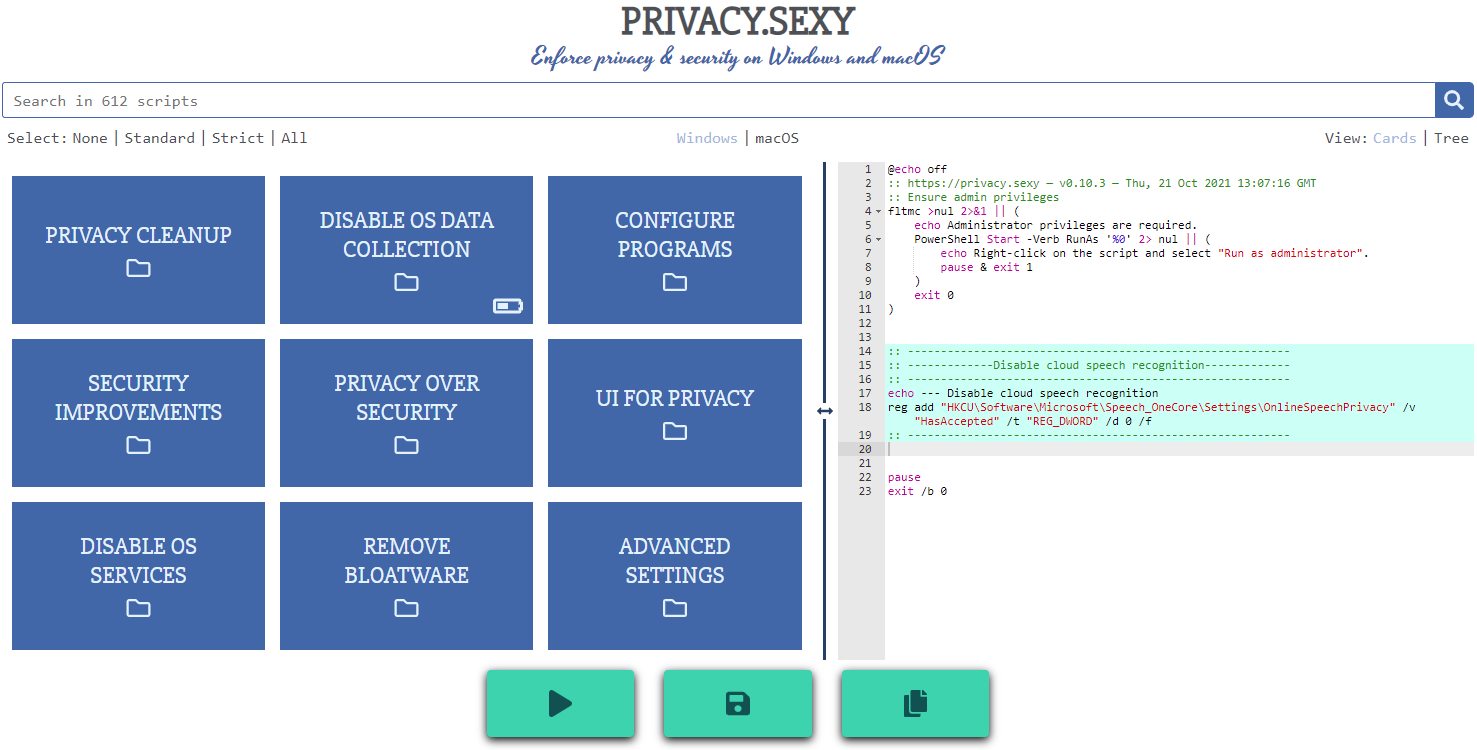
Features
- Rich: Hundreds of scripts that aims to give you control of your data.
- Free: Both free as in "beer" and free as in "speech".
- Transparent. Have full visibility into what the tweaks do as you enable them.
- Reversible. Revert if something feels wrong.
- Accessible. No need to run any compiled software on your computer with web version.
- Open. What you see as code in this repository is what you get. The application itself, its infrastructure and deployments are open-source and automated thanks to bump-everywhere.
- Tested. A lot of tests. Automated and manual. Community-testing and verification. Stability improvements comes before new features.
- Extensible. Effortlessly extend scripts with a custom designed templating language.
- Portable and simple. Every script is independently executable without cross-dependencies.
Support
Sponsor 💕. Consider sponsoring on GitHub Sponsors, or you can donate using other ways such as crypto or a coffee.
Star 🤩. Feel free to give it a star ⭐ .
Contribute 👷. Contributions of any type are welcome. See CONTRIBUTING.md as the starting point. It includes useful information like how to add new scripts.
Additional Install Options
-
Check the releases page for all available versions.
-
Using Scoop package manager on Windows:
  scoop bucket add extras
  scoop install privacy.sexy
Development
Refer to development.md for Docker usage and reading more about setting up your development environment.
Check architecture.md for an overview of design and how different parts and layers work together. You can refer to application.md for a closer look at application layer codebase and presentation.md for code related to GUI layer. collection-files.md explains the YAML files that are the core of the application and templating.md documents how to use templating language in those files. In ci-cd.md, you can read more about the pipelines that automates maintenance tasks and ensures you get what see.
docs/ folder includes all other documentation.
Security
Security is a top priority at privacy.sexy. An extensive commitment to security verification ensures this priority. For any security concerns or vulnerabilities, please consult the Security Policy.