 undergroundwires
8c17396285
undergroundwires
8c17396285
This commit improves the management of script execution process by
enhancing the way terminal commands are handled, paving the way for
easier future modifications and providing clearer feedback to users when
scripts are cancelled.

Previously, the UI displayed a generic error message which could lead to
confusion if the user intentionally cancelled the script execution. Now,
a specific error dialog will appear, improving the user experience by
accurately reflecting the action taken by the user.

This change affects code execution on Linux where closing GNOME terminal
returns exit code `137` which is then treated by script cancellation by
privacy.sexy to show the accurate error dialog. It does not affect macOS
and Windows as curret commands result in success (`0`) exit code on
cancellation.

Additionally, this update encapsulates OS-specific logic into dedicated
classes, promoting better separation of concerns and increasing the
modularity of the codebase. This makes it simpler to maintain and extend
the application.

Key changes:

- Display a specific error message for script cancellations.
- Refactor command execution into dedicated classes.
- Improve file permission setting flexibility and avoid setting file
  permissions on Windows as it's not required to execute files.
- Introduce more granular error types for script execution.
- Increase logging for shell commands to aid in debugging.
- Expand test coverage to ensure reliability.
- Fix error dialogs not showing the error messages due to incorrect
  propagation of errors.

Other supported changes:

- Update `SECURITY.md` with details on script readback and verification.
- Fix a typo in `IpcRegistration.spec.ts`.
- Document antivirus scans in `desktop-vs-web-features.md`.
privacy.sexy — Privacy is sexy
Enforce privacy & security best-practices on Windows, macOS and Linux, because privacy is sexy.
















Get started
- 🌍️ Online: https://privacy.sexy.
- 🖥️ Offline: Download directly for: Windows, macOS, Linux. For more options, see here.
See also:
- Desktop vs. Web Features: Differences and unique aspects of desktop and web versions.
- System Requirements: Hardware and software requirements for the desktop version.
💡 Regularly applying your configuration with privacy.sexy is recommended, especially after each new release and major operating system updates. Each version updates scripts to enhance stability, privacy, and security.
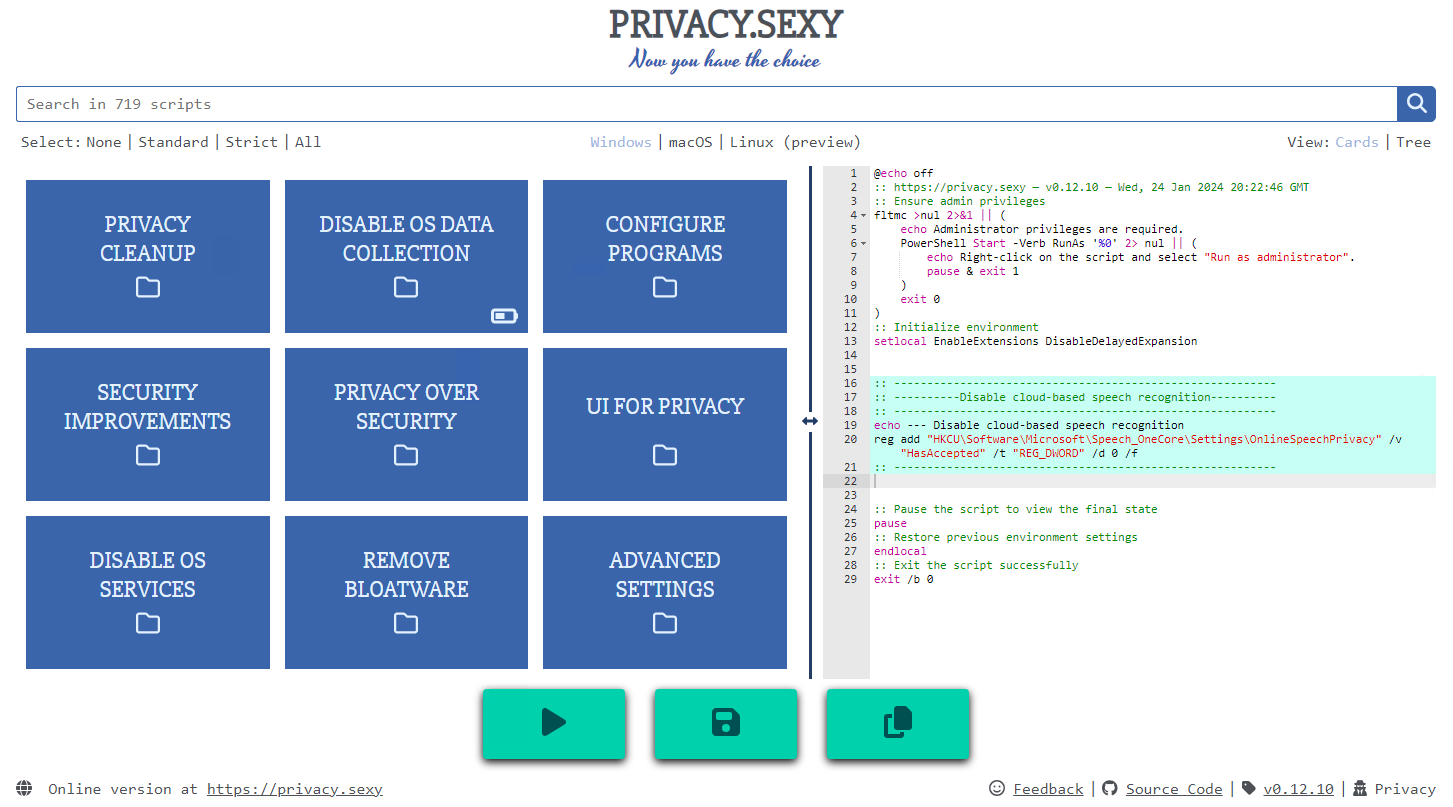
Features
- Rich: Hundreds of scripts that aims to give you control of your data.
- Free: Both free as in "beer" and free as in "speech".
- Transparent. Have full visibility into what the tweaks do as you enable them.
- Reversible. Revert if something feels wrong.
- Accessible. No need to run any compiled software on your computer with web version.
- Secure: Security is a top priority at privacy.sexy with comprehensive safeguards in place.
- Open. What you see as code in this repository is what you get. The application itself, its infrastructure and deployments are open-source and automated thanks to bump-everywhere.
- Tested. A lot of tests. Automated and manual. Community-testing and verification. Stability improvements comes before new features.
- Extensible. Effortlessly extend scripts with a custom designed templating language.
- Portable and simple. Every script is independently executable without cross-dependencies.
Support
Sponsor 💕. Consider sponsoring on GitHub Sponsors, or you can donate using other ways such as crypto or a coffee.
Star 🤩. Feel free to give it a star ⭐ .
Contribute 👷. Contributions of any type are welcome. See CONTRIBUTING.md as the starting point. It includes useful information like how to add new scripts.
Additional Install Options
- Check the releases page for all available versions.
- Other unofficial channels (not maintained by privacy.sexy) for Windows include:
-
Scoop 🥄 (latest version):
scoop bucket add extras scoop install privacy.sexy -
winget 🪟 (may be outdated):
winget install -e --id undergroundwires.privacy.sexyWith winget, updates require manual submission; the auto-update feature within privacy.sexy will notify you of new releases post-installation.
-
Development
Refer to development.md for Docker usage and reading more about setting up your development environment.
Check architecture.md for an overview of design and how different parts and layers work together. You can refer to application.md for a closer look at application layer codebase and presentation.md for code related to GUI layer. collection-files.md explains the YAML files that are the core of the application and templating.md documents how to use templating language in those files. In ci-cd.md, you can read more about the pipelines that automates maintenance tasks and ensures you get what see.
docs/ folder includes all other documentation.
Security
Security is a top priority at privacy.sexy. An extensive commitment to security verification ensures this priority. For any security concerns or vulnerabilities, please consult the Security Policy.