 7669985f8e
This commit improves multiple aspects of Docker builds:

- Enable artifact output validation for Dockerfile.
- Correct the path references in Dockerfile for the distribution
  directory.
- Add Dockerfile specific indentation rules to `.editorconfig`.
- Use `npm run install-deps` for dependency installation, enhancing
  build reliability.
- Add automation script `verify-web-server-status.js` to verify running
  web server on given URL.
- Introduce automated build verification for Dockerfile:
  - On macOS, install Docker with colima as the container runtime
    because default agents do not include Docker and Docker runtime is
    not installed due to licensing issues (see actions/runner-images#17).
  - On Windows, there's no Linux container support (actions/runner#904,
    actions/runner-images#1143), so keep the checks for macOS and Ubuntu
    only.
160 lines
8.5 KiB
Markdown
160 lines
8.5 KiB
Markdown
# privacy.sexy — Now you have the choice
|
|
|
|
> Enforce privacy & security best-practices on Windows, macOS and Linux, because privacy is sexy 🍑🍆
|
|
|
|
<!-- markdownlint-disable MD033 -->
|
|
<p align="center">
|
|
<a href="https://undergroundwires.dev/donate?project=privacy.sexy" target="_blank" rel="noopener noreferrer">
|
|
<img
|
|
alt="donation badge"
|
|
src="https://undergroundwires.dev/img/badges/donate/flat.svg"
|
|
/>
|
|
</a>
|
|
<a href="https://github.com/undergroundwires/privacy.sexy/blob/master/CONTRIBUTING.md" target="_blank" rel="noopener noreferrer">
|
|
<img
|
|
alt="contributions are welcome"
|
|
src="https://img.shields.io/badge/contributions-welcome-brightgreen.svg?style=flat"
|
|
/>
|
|
</a>
|
|
<!-- Code quality -->
|
|
<br />
|
|
<a href="https://lgtm.com/projects/g/undergroundwires/privacy.sexy/context:javascript" target="_blank" rel="noopener noreferrer">
|
|
<img
|
|
alt="Language grade: JavaScript/TypeScript"
|
|
src="https://img.shields.io/lgtm/grade/javascript/g/undergroundwires/privacy.sexy.svg?logo=lgtm&logoWidth=18"
|
|
/>
|
|
</a>
|
|
<a href="https://codeclimate.com/github/undergroundwires/privacy.sexy/maintainability" target="_blank" rel="noopener noreferrer">
|
|
<img
|
|
alt="Maintainability"
|
|
src="https://api.codeclimate.com/v1/badges/3a70b7ef602e2264342c/maintainability"
|
|
/>
|
|
</a>
|
|
<!-- Tests -->
|
|
<br />
|
|
<a href="https://github.com/undergroundwires/privacy.sexy/actions/workflows/tests.unit.yaml" target="_blank" rel="noopener noreferrer">
|
|
<img
|
|
alt="Unit tests status"
|
|
src="https://github.com/undergroundwires/privacy.sexy/workflows/unit-tests/badge.svg"
|
|
/>
|
|
</a>
|
|
<a href="https://github.com/undergroundwires/privacy.sexy/actions/workflows/tests.integration.yaml" target="_blank" rel="noopener noreferrer">
|
|
<img
|
|
alt="Integration tests status"
|
|
src="https://github.com/undergroundwires/privacy.sexy/workflows/integration-tests/badge.svg"
|
|
/>
|
|
</a>
|
|
<a href="https://github.com/undergroundwires/privacy.sexy/actions/workflows/tests.e2e.yaml" target="_blank" rel="noopener noreferrer">
|
|
<img
|
|
alt="E2E tests status"
|
|
src="https://github.com/undergroundwires/privacy.sexy/workflows/e2e-tests/badge.svg"
|
|
/>
|
|
</a>
|
|
<!-- Checks -->
|
|
<br />
|
|
<a href="https://github.com/undergroundwires/privacy.sexy/actions/workflows/checks.quality.yaml" target="_blank" rel="noopener noreferrer">
|
|
<img
|
|
alt="Quality checks status"
|
|
src="https://github.com/undergroundwires/privacy.sexy/workflows/quality-checks/badge.svg"
|
|
/>
|
|
</a>
|
|
<a href="https://github.com/undergroundwires/privacy.sexy/actions/workflows/checks.security.yaml" target="_blank" rel="noopener noreferrer">
|
|
<img
|
|
alt="Security checks status"
|
|
src="https://github.com/undergroundwires/privacy.sexy/workflows/security-checks/badge.svg"
|
|
/>
|
|
</a>
|
|
<a href="https://github.com/undergroundwires/privacy.sexy/actions/workflows/checks.build.yaml" target="_blank" rel="noopener noreferrer">
|
|
<img
|
|
alt="Status of build checks"
|
|
src="https://github.com/undergroundwires/privacy.sexy/workflows/checks.build/badge.svg"
|
|
/>
|
|
</a>
|
|
<a href="https://github.com/undergroundwires/privacy.sexy/actions/workflows/checks.desktop-runtime-errors.yaml" target="_blank" rel="noopener noreferrer">
|
|
<img
|
|
alt="Status of runtime error checks for the desktop application"
|
|
src="https://github.com/undergroundwires/privacy.sexy/workflows/checks.desktop-runtime-errors/badge.svg"
|
|
/>
|
|
</a>
|
|
<a href="https://github.com/undergroundwires/privacy.sexy/actions/workflows/checks.scripts.yaml" target="_blank" rel="noopener noreferrer">
|
|
<img
|
|
alt="Status of script checks"
|
|
src="https://github.com/undergroundwires/privacy.sexy/workflows/checks.scripts/badge.svg"
|
|
/>
|
|
</a>
|
|
<a href="https://github.com/undergroundwires/privacy.sexy/actions/workflows/checks.external-urls.yaml" target="_blank" rel="noopener noreferrer">
|
|
<img
|
|
alt="Status of external URL checks"
|
|
src="https://github.com/undergroundwires/privacy.sexy/workflows/checks.external-urls/badge.svg"
|
|
/>
|
|
</a>
|
|
<!-- Release -->
|
|
<br />
|
|
<a href="https://github.com/undergroundwires/privacy.sexy/actions/workflows/release.git.yaml" target="_blank" rel="noopener noreferrer">
|
|
<img
|
|
alt="Git release status"
|
|
src="https://github.com/undergroundwires/privacy.sexy/workflows/release-git/badge.svg"
|
|
/>
|
|
</a>
|
|
<a href="https://github.com/undergroundwires/privacy.sexy/actions/workflows/release.site.yaml" target="_blank" rel="noopener noreferrer">
|
|
<img
|
|
alt="Site release status"
|
|
src="https://github.com/undergroundwires/privacy.sexy/workflows/release-site/badge.svg"
|
|
/>
|
|
</a>
|
|
<a href="https://github.com/undergroundwires/privacy.sexy/actions/workflows/release.desktop.yaml" target="_blank" rel="noopener noreferrer">
|
|
<img
|
|
alt="Desktop application release status"
|
|
src="https://github.com/undergroundwires/privacy.sexy/workflows/release-desktop/badge.svg"
|
|
/>
|
|
</a>
|
|
<!-- Others -->
|
|
<br />
|
|
<a href="https://github.com/undergroundwires/bump-everywhere" target="_blank" rel="noopener noreferrer">
|
|
<img
|
|
alt="Auto-versioned by bump-everywhere"
|
|
src="https://github.com/undergroundwires/bump-everywhere/blob/master/badge.svg?raw=true"
|
|
/>
|
|
</a>
|
|
</p>
|
|
<!-- markdownlint-restore -->
|
|
|
|
## Get started
|
|
|
|
- 🌍️ **Online**: [https://privacy.sexy](https://privacy.sexy).
|
|
- 🖥️ **Offline**: Check [releases page](https://github.com/undergroundwires/privacy.sexy/releases), or download directly for: [Windows](https://github.com/undergroundwires/privacy.sexy/releases/download/0.12.4/privacy.sexy-Setup-0.12.4.exe), [macOS](https://github.com/undergroundwires/privacy.sexy/releases/download/0.12.4/privacy.sexy-0.12.4.dmg), [Linux](https://github.com/undergroundwires/privacy.sexy/releases/download/0.12.4/privacy.sexy-0.12.4.AppImage).
|
|
|
|
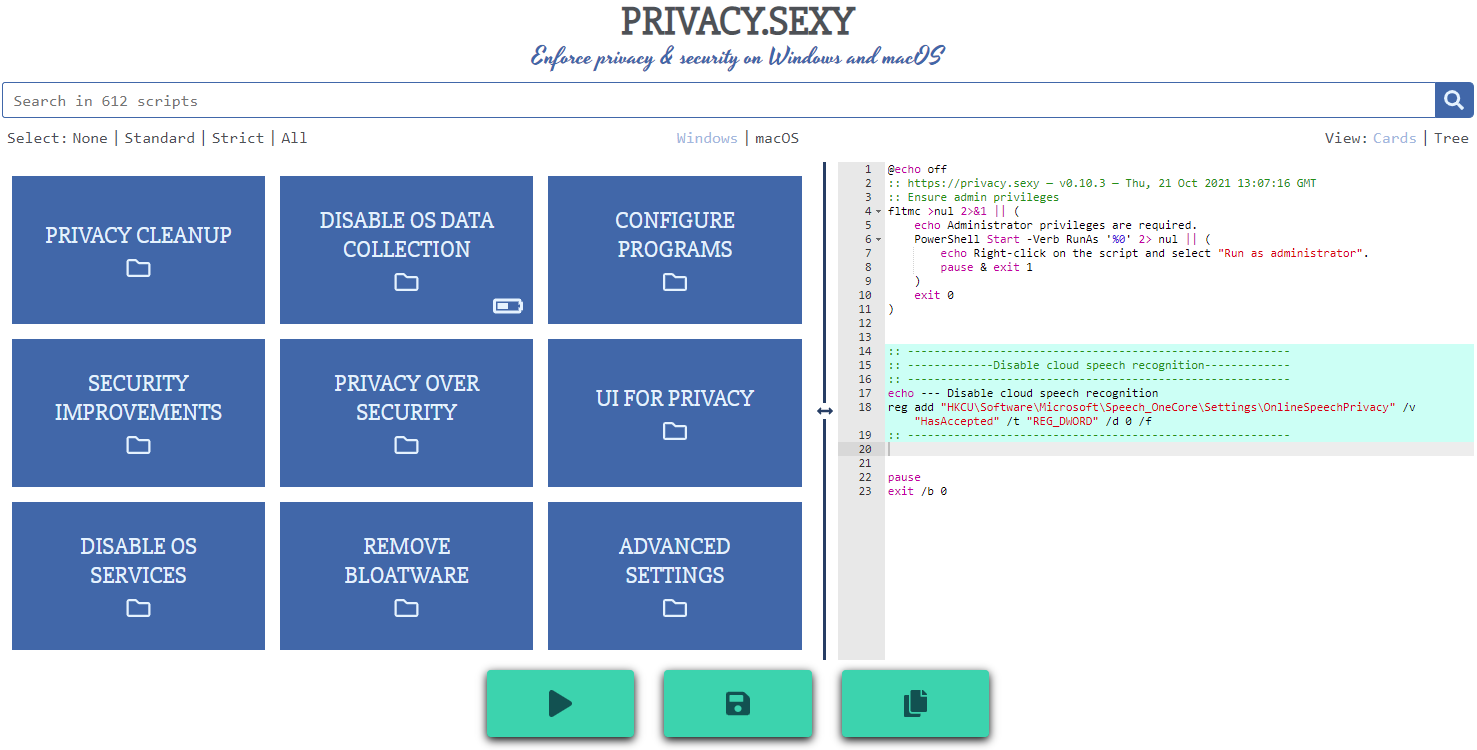
Online version does not require to run any software on your computer. Offline version has more functions such as running the scripts directly.
|
|
|
|
💡 You should apply your configuration from time to time (more than once). It would strengthen your privacy and security control because privacy.sexy and its scripts get better and stronger in every new version.
|
|
|
|
[](https://privacy.sexy)
|
|
|
|
## Features
|
|
|
|
- **Rich**: Hundreds of scripts that aims to give you control of your data.
|
|
- **Free**: Both free as in "beer" and free as in "speech".
|
|
- **Transparent**. Have full visibility into what the tweaks do as you enable them.
|
|
- **Reversible**. Revert if something feels wrong.
|
|
- **Accessible**. No need to run any compiled software on your computer with web version.
|
|
- **Open**. What you see as code in this repository is what you get. The application itself, its infrastructure and deployments are open-source and automated thanks to [bump-everywhere](https://github.com/undergroundwires/bump-everywhere).
|
|
- **Tested**. A lot of tests. Automated and manual. Community-testing and verification. Stability improvements comes before new features.
|
|
- **Extensible**. Effortlessly [extend scripts](./CONTRIBUTING.md#extend-scripts) with a custom designed [templating language](./docs/templating.md).
|
|
- **Portable and simple**. Every script is independently executable without cross-dependencies.
|
|
|
|
## Support
|
|
|
|
**Sponsor 💕**. Consider sponsoring on [GitHub Sponsors](https://github.com/sponsors/undergroundwires), or you can donate using [other ways such as crypto or a coffee](https://undergroundwires.dev/donate).
|
|
|
|
**Star 🤩**. Feel free to give it a star ⭐ .
|
|
|
|
**Contribute 👷**. Contributions of any type are welcome. See [CONTRIBUTING.md](./CONTRIBUTING.md) as the starting point. It includes useful information like [how to add new scripts](./CONTRIBUTING.md#extend-scripts).
|
|
|
|
## Development
|
|
|
|
Refer to [development.md](./docs/development.md) for Docker usage and reading more about setting up your development environment.
|
|
|
|
Check [architecture.md](./docs/architecture.md) for an overview of design and how different parts and layers work together. You can refer to [application.md](./docs/application.md) for a closer look at application layer codebase and [presentation.md](./docs/presentation.md) for code related to GUI layer. [collection-files.md](./docs/collection-files.md) explains the YAML files that are the core of the application and [templating.md](./docs/templating.md) documents how to use templating language in those files. In [ci-cd.md](./docs/ci-cd.md), you can read more about the pipelines that automates maintenance tasks and ensures you get what see.
|
|
|
|
[docs/](./docs/) folder includes all other documentation.
|