undergroundwires
739287ac71
undergroundwires
739287ac71
Suppress errors:
  - when deleting registry keys because the condition where key does
    not exist is not really an error,
  - when disabling a task that does not exist because absence of a task
    when trying to disable it is still a positive condition for goal to
    get rid of it,
  - when stopping or starting a service because goal is to
    disable/enable the service.

> Turn off SmartScreen App Install Control feature
- Add missing `/f` flag

> Remove "Scan with Windows Defender" option from context menu
- Add missing `/f` flag
- Remove redundant delete line in revert code
- Add missing whitespace before `/v` flag
- Instead of deleting with `/v ""`, use `/va` for explicit indent

> Disable Malicious Software Reporting tool diagnostic data
- Fix typo in revert scripts

> Turn off tamper protection
> Restrict threat history to administrators
Fix permission errors using TrustedInstaller session

> `Set-MpPreference` scripts
- Show warning when Set-MpPreference parameter is missing instead of an
  error The reasons include:
    - If the parameter is missing, functionality may be missing i.e.
      there's nothing to disable
    - In most cases different way of disabling registry is provided
    - Error is not clear and too verbose and should be implemented in a
      better way
- Add back "Limiting Defender definition updates" script due to being
  able to handle if aparameter is missing
- Add documentation for command in its script

> Disable the Potentially Unwanted Application (PUA) feature
- Fix revert code disabling another functionality

> Disable bidirectional scanning of incoming
- Fix typo

> Disable Microsoft Defender Antivirus
- Correct wrong comment regarding deprecation

> Disable Windows Defender Security Center Service
- Fix disabling not working on Windows 11
privacy.sexy
Enforce privacy & security best-practices on Windows and macOS, because privacy is sexy 🍑🍆








Get started
- Online version at https://privacy.sexy
- 💡 No need to run any compiled software on your computer.
- Alternatively download offline version for Windows, macOS or Linux.
- 💡 Single click to execute your script.
- ❗ Come back regularly to apply latest version for stronger privacy and security.
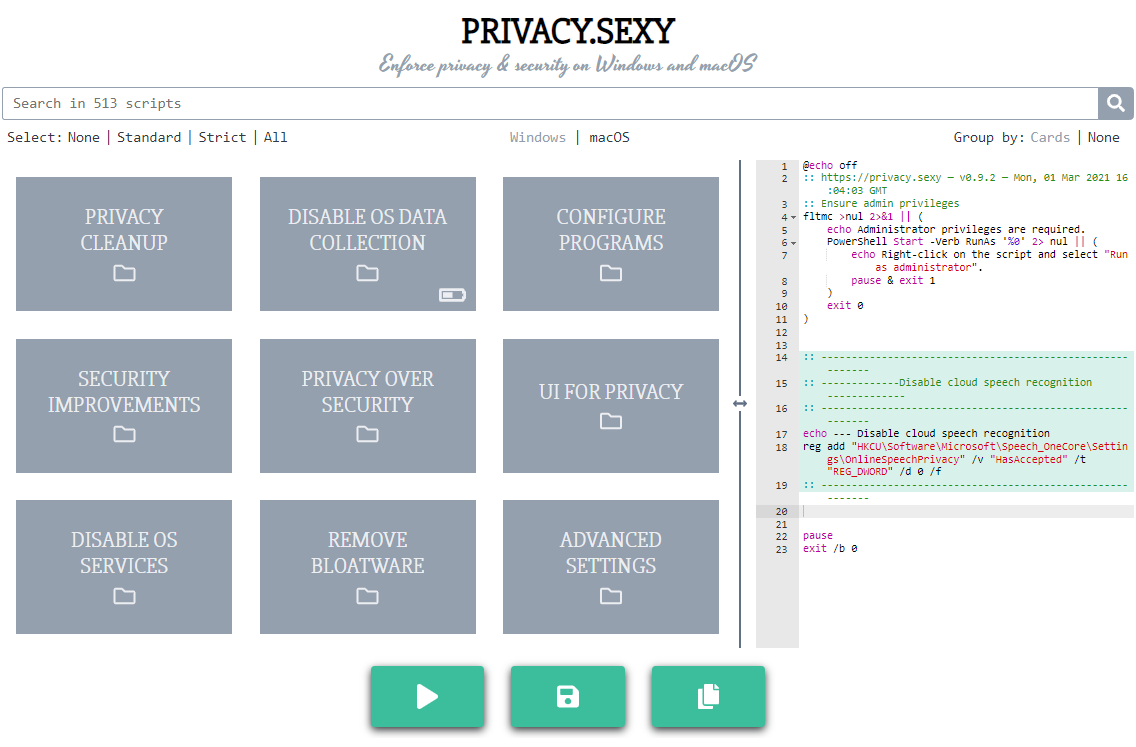
Why
- Rich tweak pool to harden security & privacy of the OS and other software on it
- Free (both free as in beer and free as in speech)
- No need to run any compiled software that has access to your system, just run the generated scripts
- Have full visibility into what the tweaks do as you enable them
- Ability to revert (undo) applied scripts
- Everything is transparent: both application and its infrastructure are open-source and automated
- Easily extendable with own powerful templating language
- Each script is independently executable without cross-dependencies
Extend scripts
- You can either create an issue
- Or send a PR:
- Fork the repository
- Add more scripts in respective script collection in collections folder.
- 📖 If you're unsure about the syntax you can refer to the collection files | documentation.
- 🙏 For any new script, please add
revertCodeanddocsvalues if possible.
- Send a pull request 👌
Commands
- Project setup:
npm install - Testing
- Run unit tests:
npm run test:unit - Run integration tests:
npm run test:integration - Lint:
npm run lint
- Run unit tests:
- Desktop app
- Development:
npm run electron:serve - Production:
npm run electron:buildto build an executable
- Development:
- Webpage
- Development:
npm run serveto compile & hot-reload for development. - Production:
npm run buildto prepare files for distribution. - Or run using Docker:
- Build:
docker build -t undergroundwires/privacy.sexy:0.10.3 . - Run:
docker run -it -p 8080:80 --rm --name privacy.sexy-0.10.3 undergroundwires/privacy.sexy:0.10.3
- Build:
- Development:
Architecture overview
Application
- Powered by TypeScript, Vue.js and Electron 💪
- and driven by Domain-driven design, Event-driven architecture, Data-driven programming concepts.
- Application uses highly decoupled models & services in different DDD layers.
- 📖 Read more on • Presentation • Application

AWS Infrastructure
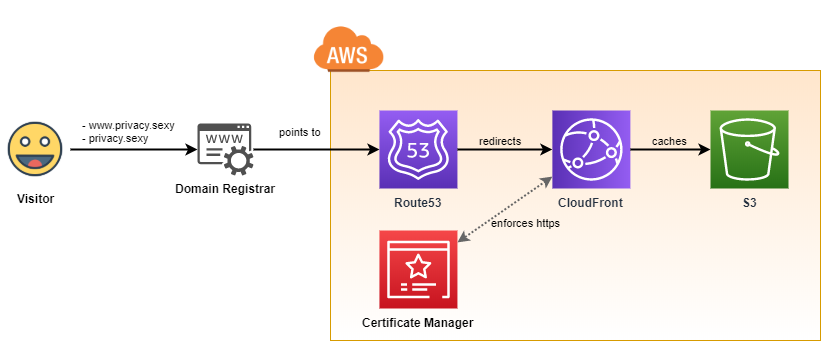
- It uses infrastructure from the following repository: aws-static-site-with-cd
- Runs on AWS 100% serverless and automatically provisioned using GitHub Actions.
- Maximum security & automation and minimum AWS costs are the highest priorities of the design.
GitOps: CI/CD to AWS
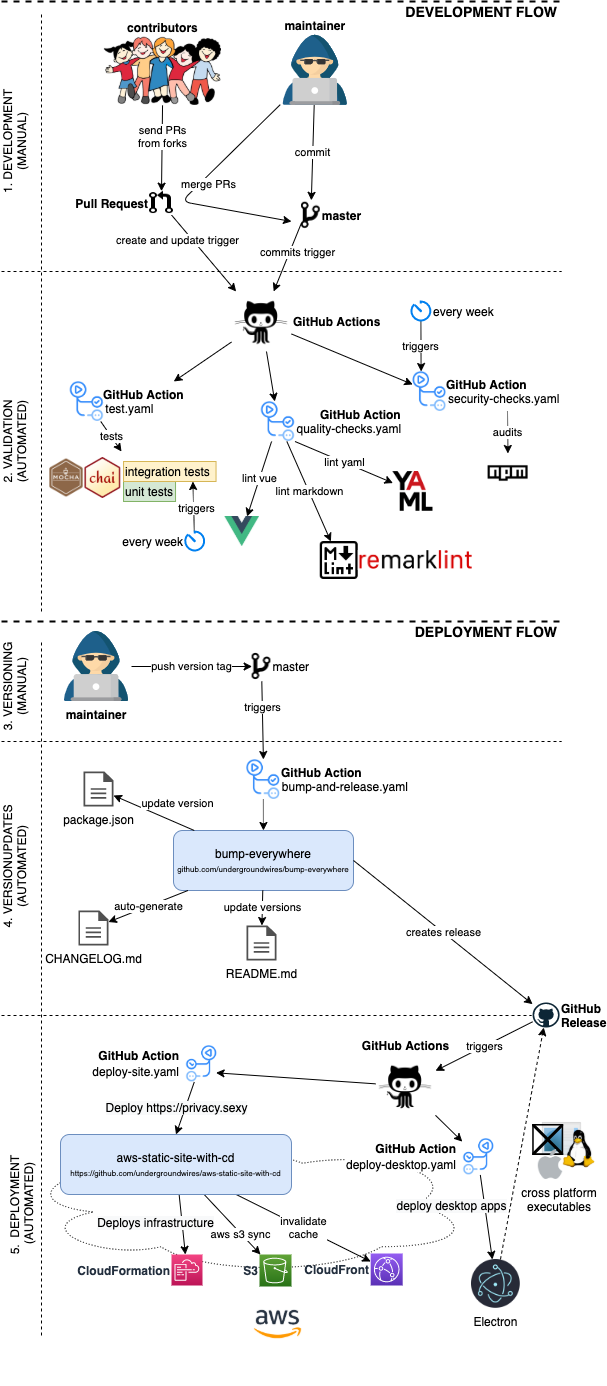
- CI/CD is fully automated for this repo using different GIT events & GitHub actions.
- Versioning, tagging, creation of
CHANGELOG.mdand releasing is automated using bump-everywhere action
- Versioning, tagging, creation of
- Everything that's merged in the master goes directly to production.