5ead1a087d
The main goal is to highlight and exclude scripts that clears user data
(such as Chrome bookmarks) from standard recommendation, thus allowing
more granular and intentional user selection. Because scripts that are
recommended as "standard" should be non-breaking.

Standard: Recommend only clearing data that would not be noticable by
user. E.g. caches and logs.
Strict	: Recommend clearing data that may be noticable by user, but
does not affect stored consciously data by user. E.g. cookies.
Do not recommend if data is stored consciously by user. E.g. favorites
/ bookmarks.

[General]
  - Change wording from "Clear xx traces" to "Clean xx history" to make
  it more clear and unify the naming with macOS scripts.
  - More documentation both in code and both as more references.

[Chrome]
  - Unrecommend deleting Chrome user profile.
  - Document what each chrome clean-up script is doing in more detail.

[Internet Explorer]
  - Document IE scripts better.
  - For Cookie cleanup, add solutions for later Windows version.
  - Unrecommend some from standard.
  - Remove undocumented `Local Settings\Traces` folder.
  - Take ownership before deleting Temporary Internet Files. Fixes
    permission error.
  - Remove `INetCookies\PrivacIE` script because it's undocumented and
    we already have cleanup for its parent folder (`INetCookies`).
  - Remove "%USERPROFILE%\Local Settings\Traces" due to lack of
    documentation.

[Safari]
  - Remove cleanup for undocumented traces folders `Safari\Traces`.
  - Document with subcategories and references.
  - Fix clearing all data not pointing to `localappdata`.
  - Unrecomend clearing all data.

[Opera]
  - Rename to "Clear all.." to show intent.
  - Unrecommend as it removes everything.
privacy.sexy
Enforce privacy & security best-practices on Windows and macOS, because privacy is sexy 🍑🍆








Get started
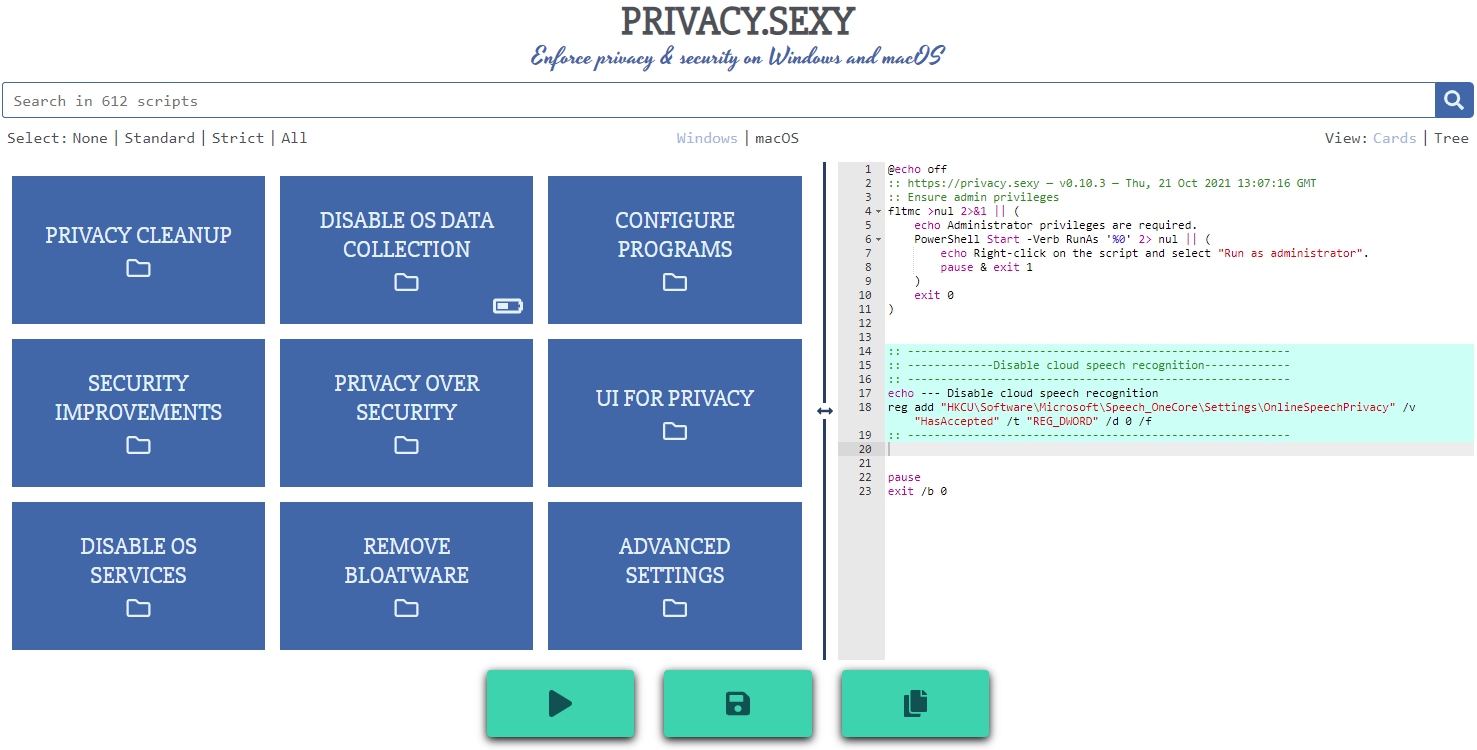
- Online version at https://privacy.sexy
- 💡 No need to run any compiled software on your computer.
- Alternatively download offline version for Windows, macOS or Linux.
- 💡 Single click to execute your script.
- ❗ Come back regularly to apply latest version for stronger privacy and security.
Why
- Rich tweak pool to harden security & privacy of the OS and other software on it
- Free (both free as in beer and free as in speech)
- No need to run any compiled software that has access to your system, just run the generated scripts
- Have full visibility into what the tweaks do as you enable them
- Ability to revert (undo) applied scripts
- Everything is transparent: both application and its infrastructure are open-source and automated
- Easily extendable with own powerful templating language
- Each script is independently executable without cross-dependencies
Extend scripts
- You can either create an issue
- Or send a PR:
- Fork the repository
- Add more scripts in respective script collection in collections folder.
- 📖 If you're unsure about the syntax you can refer to the collection files | documentation.
- 🙏 For any new script, please add
revertCodeanddocsvalues if possible.
- Send a pull request 👌
Commands
- Project setup:
npm install - Testing
- Run unit tests:
npm run test:unit - Run integration tests:
npm run test:integration - Lint:
npm run lint
- Run unit tests:
- Desktop app
- Development:
npm run electron:serve - Production:
npm run electron:buildto build an executable
- Development:
- Webpage
- Development:
npm run serveto compile & hot-reload for development. - Production:
npm run buildto prepare files for distribution. - Or run using Docker:
- Build:
docker build -t undergroundwires/privacy.sexy:0.11.0 . - Run:
docker run -it -p 8080:80 --rm --name privacy.sexy-0.11.0 undergroundwires/privacy.sexy:0.11.0
- Build:
- Development:
Architecture overview
Application
- Powered by TypeScript, Vue.js and Electron 💪
- and driven by Domain-driven design, Event-driven architecture, Data-driven programming concepts.
- Application uses highly decoupled models & services in different DDD layers.
- 📖 Read more on • Presentation • Application

AWS Infrastructure
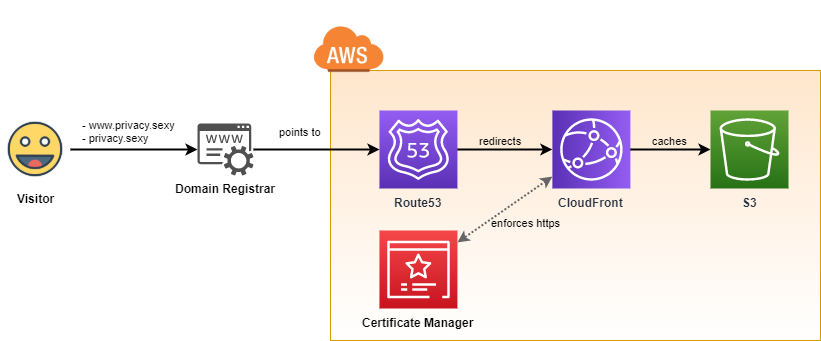
- It uses infrastructure from the following repository: aws-static-site-with-cd
- Runs on AWS 100% serverless and automatically provisioned using GitHub Actions.
- Maximum security & automation and minimum AWS costs are the highest priorities of the design.
GitOps: CI/CD to AWS
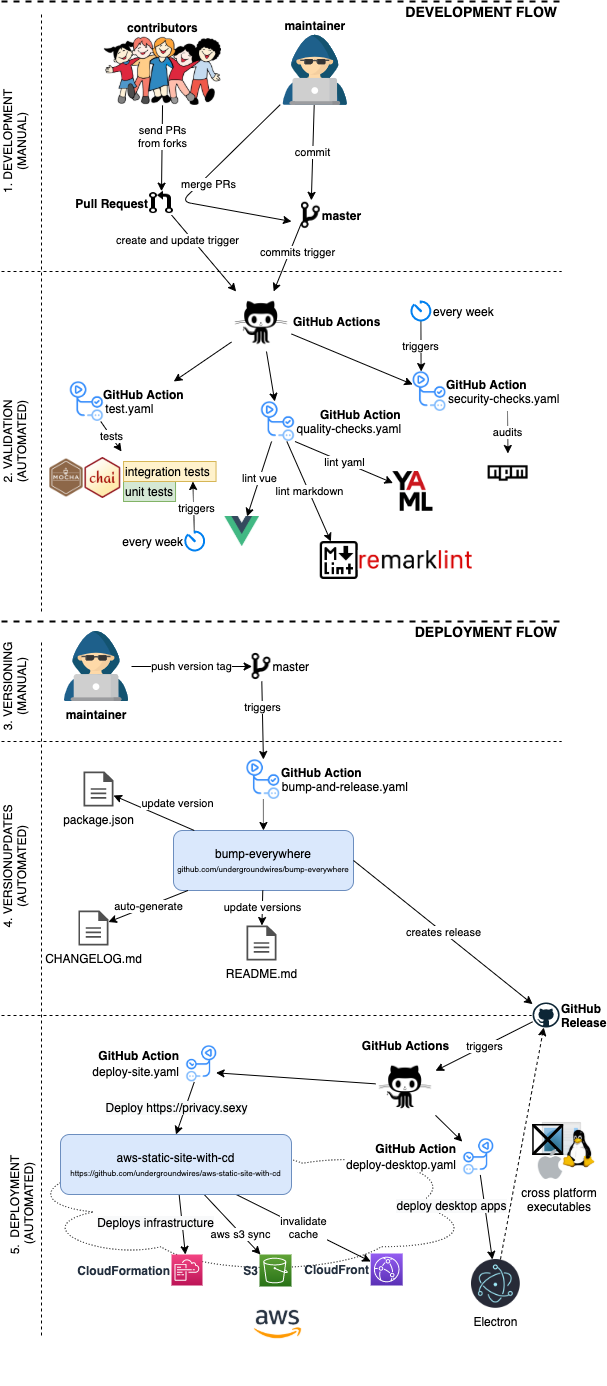
- CI/CD is fully automated for this repo using different GIT events & GitHub actions.
- Versioning, tagging, creation of
CHANGELOG.mdand releasing is automated using bump-everywhere action
- Versioning, tagging, creation of
- Everything that's merged in the master goes directly to production.