 undergroundwires
5721796378
undergroundwires
5721796378
- Introduce `fresh-npm-install.sh` to automate clean npm environment
  setup.
- Revert workaround 924b326244, resolved
  by updating Font Awesome.
- Remove `vue-template-compiler` and `@vue/test-utils` from
  dependencies, they're obsolete in 2.7.
- Update anchor references to start with lower case in line with
  MD051/link-fragments, introduced by updated `markdownlint`.
- Upgrade cypress to > 10, which includes:
  - Change spec extensions from `*.spec.js` to `*.cy.js`.
  - Change configuration file from `cypress.json` to
    `cypress.config.ts`.
  - Remove most configurations from `cypress/plugins/index.js`. These
    configurations were initially generated by Vue CLI but obsoleted in
    newer cypress versions.
- Lock Typescript version to 4.6.x due to lack of support in
  unmaintained Vue CLI TypeScript plugin (see vuejs/vue-cli#7401).
- Use `setWindowOpenHandler` on Electron, replacing deprecated
  `new-event` event.
- Document inability to upgrade `typescript-eslint` dependencies because
  `@vue/eslint-config-typescript` does not support them. See
   vuejs/eslint-config-typescript#60, vuejs/eslint-config-typescript#59,
   vuejs/eslint-config-typescript#57.
- Fix `typescript` version to 4.6.X and `tslib` version to 2.4.x,
  unit tests exit with a maximum call stack size exceeded error:

  ```
    ...
    MOCHA  Testing...
    RUNTIME EXCEPTION  Exception occurred while loading your tests
    [=========================] 100% (completed)
    RangeError: Maximum call stack size exceeded
      at RegExp.exec (<anonymous>)
      at retrieveSourceMapURL (/project/node_modules/source-map-support/source-map-support.js:174:21)
      at Array.<anonymous> (/project/node_modules/source-map-support/source-map-support.js:186:26)
      at /project/node_modules/source-map-support/source-map-support.js:85:24
      at mapSourcePosition (/project/node_modules/source-map-support/source-map-support.js:216:21)
    ...
  ```

  Issue has been reported but not fixed, suggested solutions did not
  work, see evanw/node-source-map-support#252.
- Update `vue-cli-plugin-electron-builder` to latest alpha version. This
  allows upgrading `ts-loader` to latest and using latest
  `electron-builder`. Change `main` property value in `package.json` to
  `index.js` for successful electron builds (see
  nklayman/vue-cli-plugin-electron-builder#188).
privacy.sexy
Enforce privacy & security best-practices on Windows, macOS and Linux, because privacy is sexy 🍑🍆













Get started
- 🌍️ Online: https://privacy.sexy.
- 🖥️ Offline: Check releases page, or download directly for: Windows, macOS, Linux.
Online version does not require to run any software on your computer. Offline version has more functions such as running the scripts directly.
💡 You should apply your configuration from time to time (more than once). It would strengthen your privacy and security control because privacy.sexy and its scripts get better and stronger in every new version.
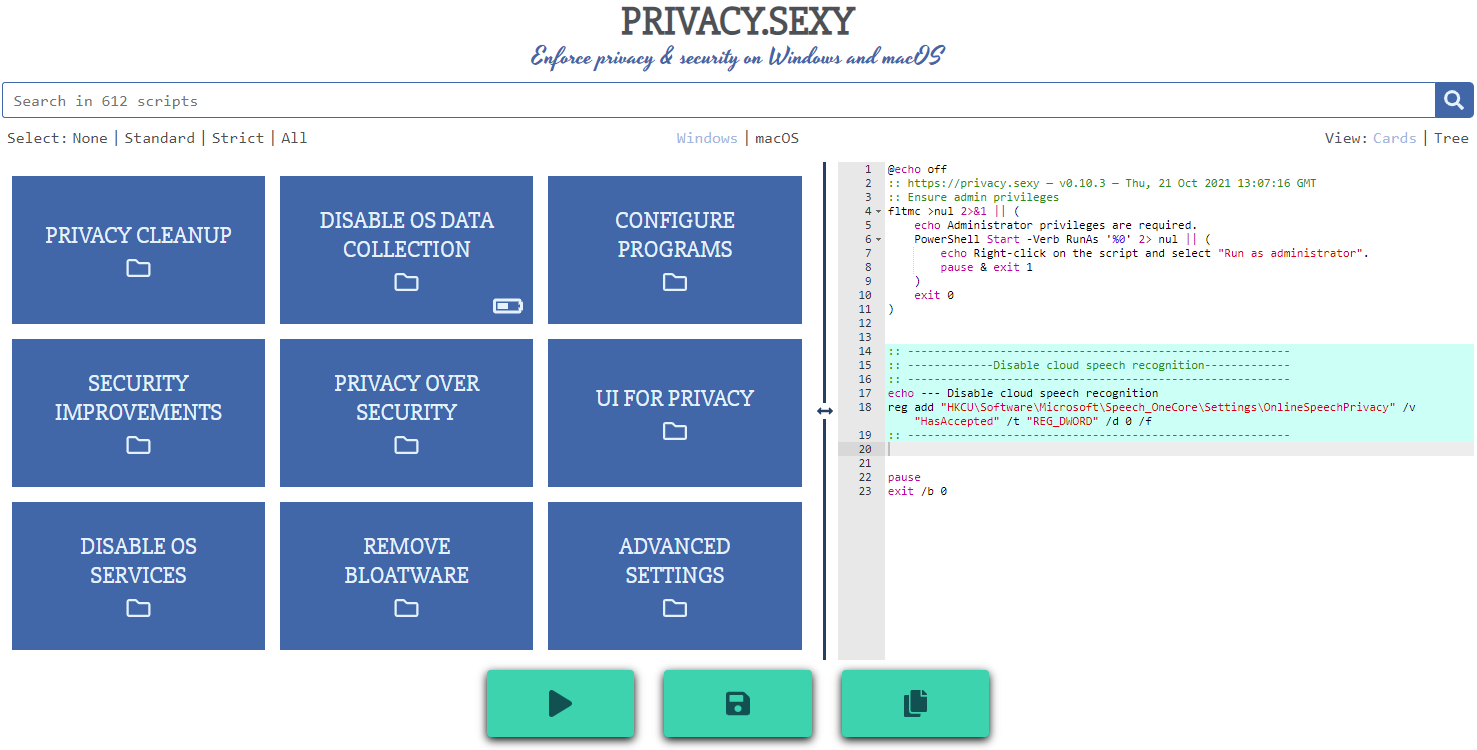
Features
- Rich: Hundreds of scripts that aims to give you control of your data.
- Free: Both free as in "beer" and free as in "speech".
- Transparent. Have full visibility into what the tweaks do as you enable them.
- Reversible. Revert if something feels wrong.
- Accessible. No need to run any compiled software on your computer with web version.
- Open. What you see as code in this repository is what you get. The application itself, its infrastructure and deployments are open-source and automated thanks to bump-everywhere.
- Tested. A lot of tests. Automated and manual. Community-testing and verification. Stability improvements comes before new features.
- Extensible. Effortlessly extend scripts with a custom designed templating language.
- Portable and simple. Every script is independently executable without cross-dependencies.
Support
Sponsor 💕. Consider sponsoring on GitHub Sponsors, or you can donate using other ways such as crypto or a coffee.
Star 🤩. Feel free to give it a star ⭐ .
Contribute 👷. Contributions of any type are welcome. See CONTRIBUTING.md as the starting point. It includes useful information like how to add new scripts.
Development
Refer to development.md for Docker usage and reading more about setting up your development environment.
Check architecture.md for an overview of design and how different parts and layers work together. You can refer to application.md for a closer look at application layer codebase and presentation.md for code related to GUI layer. collection-files.md explains the YAML files that are the core of the application and templating.md documents how to use templating language in those files. In ci-cd.md, you can read more about the pipelines that automates maintenance tasks and ensures you get what see.
docs/ folder includes all other documentation.