2e082932c9
Change behavior of registry reverting from adding default value to
removing value that overrides. It then leaves the system in cleaner
state, removes "managed by your organization" warning, and makes the
scripts more future-proof providing compatibility with Microsoft patches
updating the defaults. This is implemented by using `reg delete` over
`reg add` and `Remove-MpPreference` over `Set-MpPreference`.

> Disable Windows Defender Scheduled Scan task
Surpress the error when reverting the script as the task may not exist
in some Windows versions.

> Limit catch-up security intelligence (signature) updates
Change to "Disable" instead of "Limit", and bring back its revert code.

Fix reverting of following scripts setting non-default values:
  > Turn off Windows Defender SpyNet reporting
  > Disable checking for signatures before scan
  > Limit CPU usage during idle scans to minumum
  > Disable scanning when not idle
  > Disable scanning on mapped network drives on full-scan

Fix following scripts setting unexpected behavior:
  > Disable running scheduled auto-remediation
  > Limit CPU usage during idle scans to minumum
  > Disable randomizing scheduled task times
  > Disable creating system restore point on a daily basis

Add more documentation for MpPreference module:
  - Add more reference URLs
  - Add status query as documentation
  - Add information regarding default values
  - Describe meaning of enumeration values
  - Document commands not doing expected in Windows 11
privacy.sexy
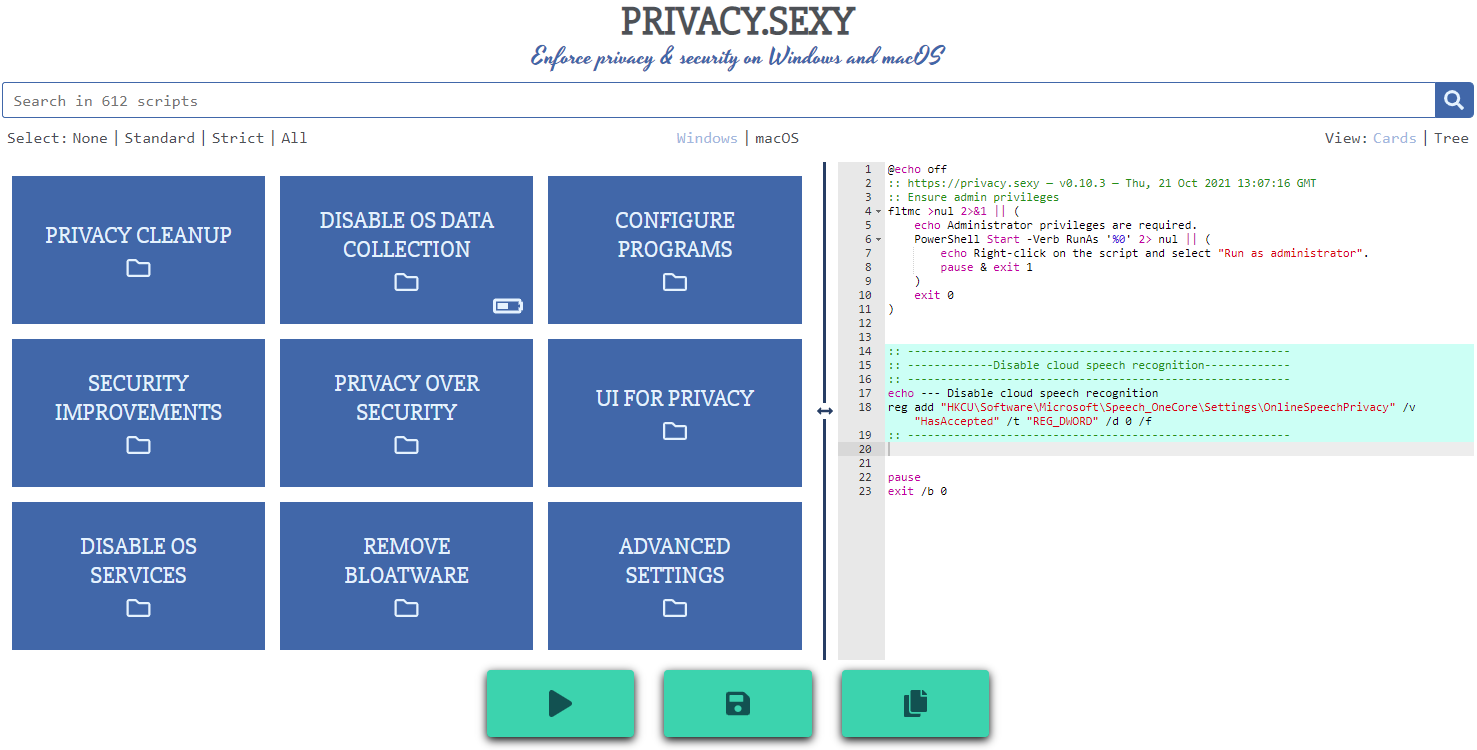
Enforce privacy & security best-practices on Windows and macOS, because privacy is sexy 🍑🍆








Get started
- Online version at https://privacy.sexy
- 💡 No need to run any compiled software on your computer.
- Alternatively download offline version for Windows, macOS or Linux.
- 💡 Single click to execute your script.
- ❗ Come back regularly to apply latest version for stronger privacy and security.
Why
- Rich tweak pool to harden security & privacy of the OS and other software on it
- Free (both free as in beer and free as in speech)
- No need to run any compiled software that has access to your system, just run the generated scripts
- Have full visibility into what the tweaks do as you enable them
- Ability to revert (undo) applied scripts
- Everything is transparent: both application and its infrastructure are open-source and automated
- Easily extendable with own powerful templating language
- Each script is independently executable without cross-dependencies
Extend scripts
- You can either create an issue
- Or send a PR:
- Fork the repository
- Add more scripts in respective script collection in collections folder.
- 📖 If you're unsure about the syntax you can refer to the collection files | documentation.
- 🙏 For any new script, please add
revertCodeanddocsvalues if possible.
- Send a pull request 👌
Commands
- Project setup:
npm install - Testing
- Run unit tests:
npm run test:unit - Run integration tests:
npm run test:integration - Lint:
npm run lint
- Run unit tests:
- Desktop app
- Development:
npm run electron:serve - Production:
npm run electron:buildto build an executable
- Development:
- Webpage
- Development:
npm run serveto compile & hot-reload for development. - Production:
npm run buildto prepare files for distribution. - Or run using Docker:
- Build:
docker build -t undergroundwires/privacy.sexy:0.11.1 . - Run:
docker run -it -p 8080:80 --rm --name privacy.sexy-0.11.1 undergroundwires/privacy.sexy:0.11.1
- Build:
- Development:
Architecture overview
Application
- Powered by TypeScript, Vue.js and Electron 💪
- and driven by Domain-driven design, Event-driven architecture, Data-driven programming concepts.
- Application uses highly decoupled models & services in different DDD layers.
- 📖 Read more on • Presentation • Application

AWS Infrastructure
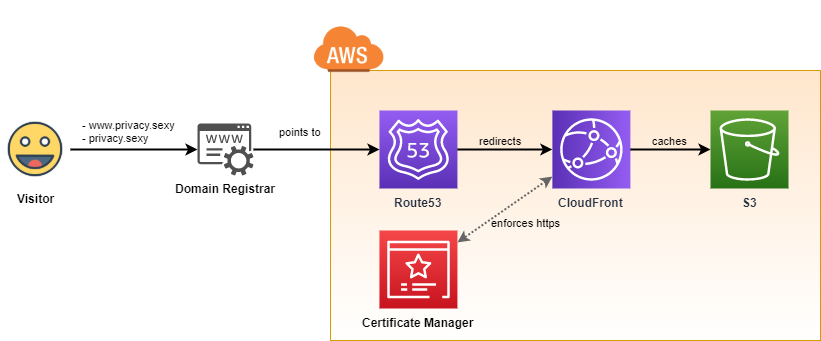
- It uses infrastructure from the following repository: aws-static-site-with-cd
- Runs on AWS 100% serverless and automatically provisioned using GitHub Actions.
- Maximum security & automation and minimum AWS costs are the highest priorities of the design.
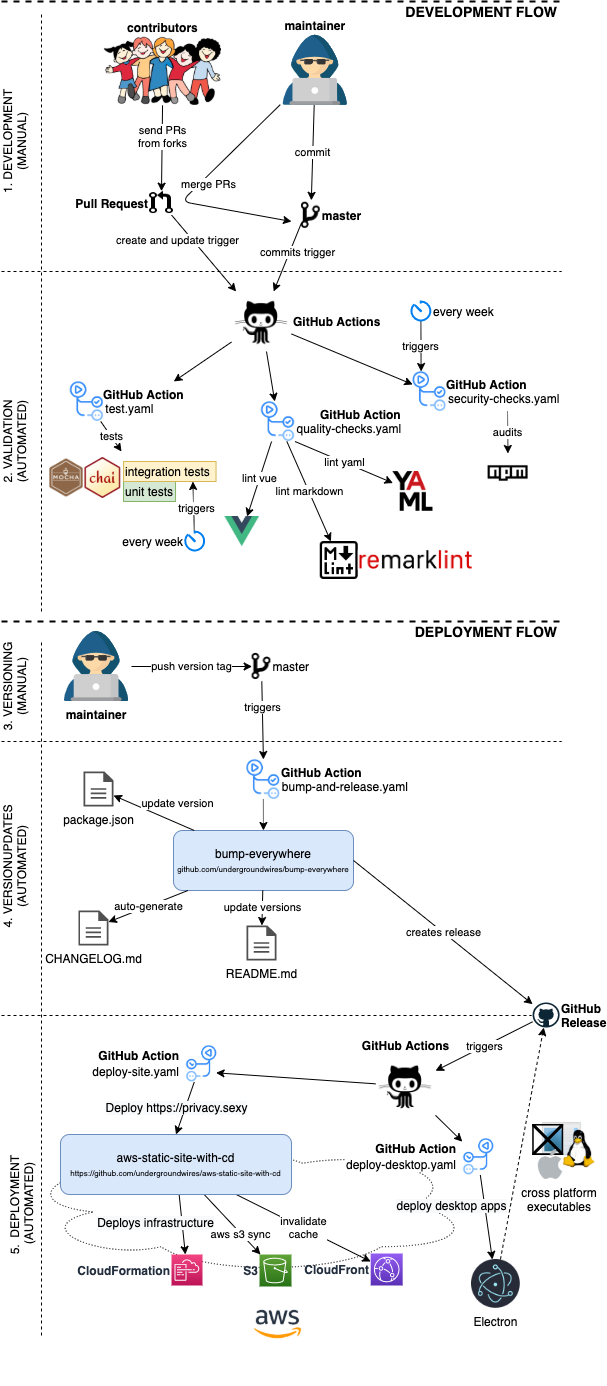
GitOps: CI/CD to AWS
- CI/CD is fully automated for this repo using different GIT events & GitHub actions.
- Versioning, tagging, creation of
CHANGELOG.mdand releasing is automated using bump-everywhere action
- Versioning, tagging, creation of
- Everything that's merged in the master goes directly to production.