 060e789662
This commit improves the security, reliability, and robustness of
directory cleanup operations on Windows.

The focus is shifted from deleting entire directories to purging their
contents, addressing potential unintended side effects. Previously,
numerous directories were removed, which could destabilize system
behavior.

This improvement has crucial security implications. The prior approach
involved changing ownership and assigning permissions to the directory
itself, leading to an altered and potentially less secure OS security
posture.

Directory removal improvements include:

- Output user-friendly messages.
- Improved ownership and permission handling for file deletion.
- Explicit shared functions for enhanced reliability/security.
- Centralized way to delete glob (wildcard) patterns in Windows.
Notable script improvements:

- 'Clear Steam dumps, logs, and traces':
  - Convert the script to a category to provide more granularity.
  - Improve cache cleaning, ensuring the entire cache directory is
    cleared, not just the log files.
- 'Clear "Temporary Internet Files" (browser cache)':
  - Add more documentation.
  - Grant necessary permissions to folders, fixing errors due to
    lack of permissions before.
- 'Clear Windows Update Medic Service logs':
  - Remove redundant permission grants, as they are unnecessary in
    recent Windows versions.
- 'Clear Server-initiated Healing Events system logs',
  'Clear Windows Update events logs':
  - Merge due to identical functionalities.
  - Add more documentation.
- 'Clear Defender scan (protection) history':
  - Remove the execution with `TrustedInstallerPrivileges`, uniformly
    using `grantPermissions` as with other scripts. This addresses the
    false-positive alerts from Microsoft Defender, as discussed in #264.
- 'Clear "Temporary Internet Files" (browser cache)':
  - Retain `INetCache` and `Temporary Internet Files` directories,
    purging only their contents. This approach aims to resolve the issue
    mentioned in #145, where the absence of these folders could prevent
    Microsoft Office applications from launching.
privacy.sexy — Now you have the choice
Enforce privacy & security best-practices on Windows, macOS and Linux, because privacy is sexy 🍑🍆
















Get started
- 🌍️ Online: https://privacy.sexy.
- 🖥️ Offline: Download directly for: Windows, macOS, Linux. For more options, see here.
Online version does not require to run any software on your computer. Offline version has more functions such as running the scripts directly.
💡 You should apply your configuration from time to time (more than once). It would strengthen your privacy and security control because privacy.sexy and its scripts get better and stronger in every new version.
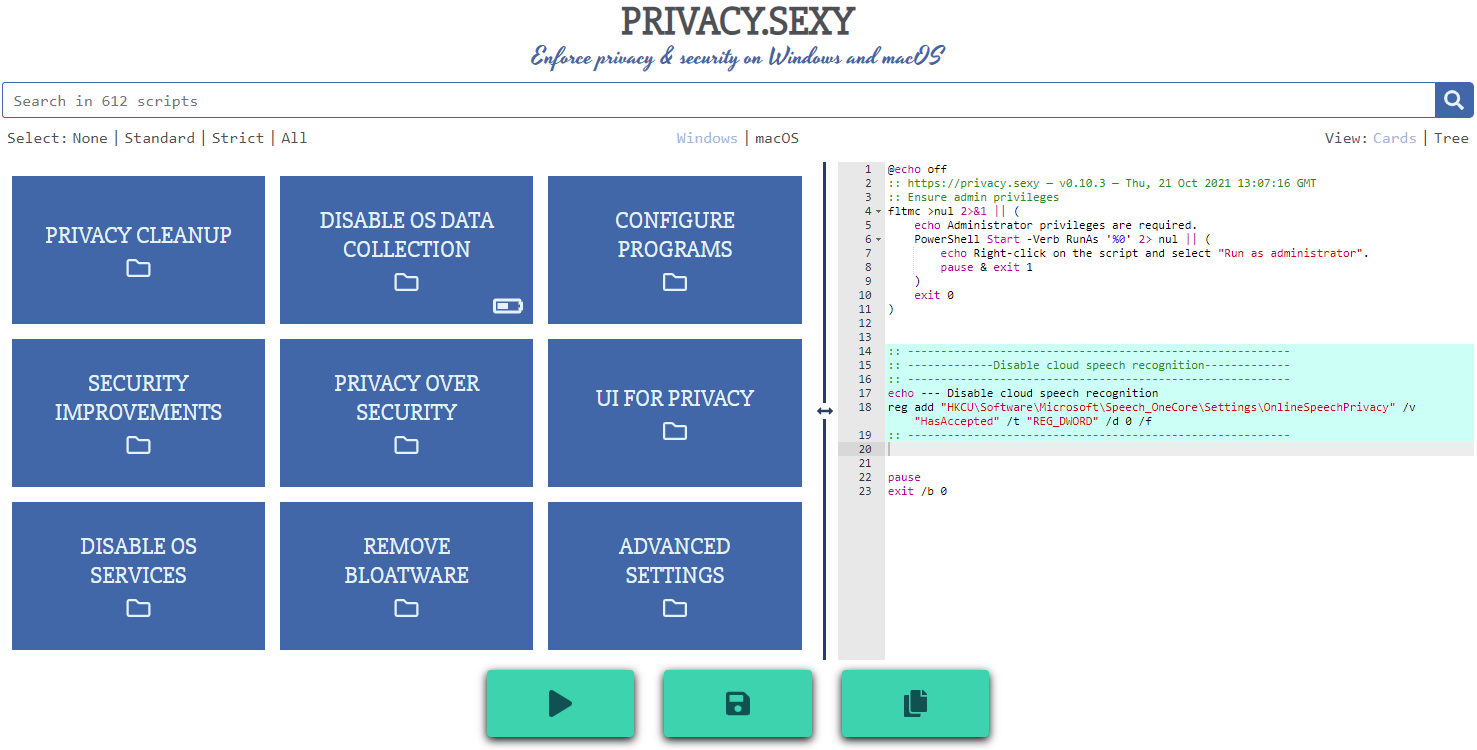
Features
- Rich: Hundreds of scripts that aims to give you control of your data.
- Free: Both free as in "beer" and free as in "speech".
- Transparent. Have full visibility into what the tweaks do as you enable them.
- Reversible. Revert if something feels wrong.
- Accessible. No need to run any compiled software on your computer with web version.
- Open. What you see as code in this repository is what you get. The application itself, its infrastructure and deployments are open-source and automated thanks to bump-everywhere.
- Tested. A lot of tests. Automated and manual. Community-testing and verification. Stability improvements comes before new features.
- Extensible. Effortlessly extend scripts with a custom designed templating language.
- Portable and simple. Every script is independently executable without cross-dependencies.
Support
Sponsor 💕. Consider sponsoring on GitHub Sponsors, or you can donate using other ways such as crypto or a coffee.
Star 🤩. Feel free to give it a star ⭐ .
Contribute 👷. Contributions of any type are welcome. See CONTRIBUTING.md as the starting point. It includes useful information like how to add new scripts.
Additional Install Options
-
Check the releases page for all available versions.
-
Using Scoop package manager on Windows:
  scoop bucket add extras
  scoop install privacy.sexy
Development
Refer to development.md for Docker usage and reading more about setting up your development environment.
Check architecture.md for an overview of design and how different parts and layers work together. You can refer to application.md for a closer look at application layer codebase and presentation.md for code related to GUI layer. collection-files.md explains the YAML files that are the core of the application and templating.md documents how to use templating language in those files. In ci-cd.md, you can read more about the pipelines that automates maintenance tasks and ensures you get what see.
docs/ folder includes all other documentation.
Security
Security is a top priority at privacy.sexy. An extensive commitment to security verification ensures this priority. For any security concerns or vulnerabilities, please consult the Security Policy.