 db47440d47
Improve documentation for different markdown documentation files. Goal
is to simplify and make the language and content more clear.
2.1 KiB
CI/CD overview
GitOps
CI/CD is fully automated using different Git events and GitHub actions. This repository uses bump-everywhere to automate versioning, tagging, creation of CHANGELOG.md and GitHub releases. A dedicated workflow release.desktop.yaml creates desktop installers and executables and attaches them into GitHub releases.
Everything that's merged in the master goes directly to production.
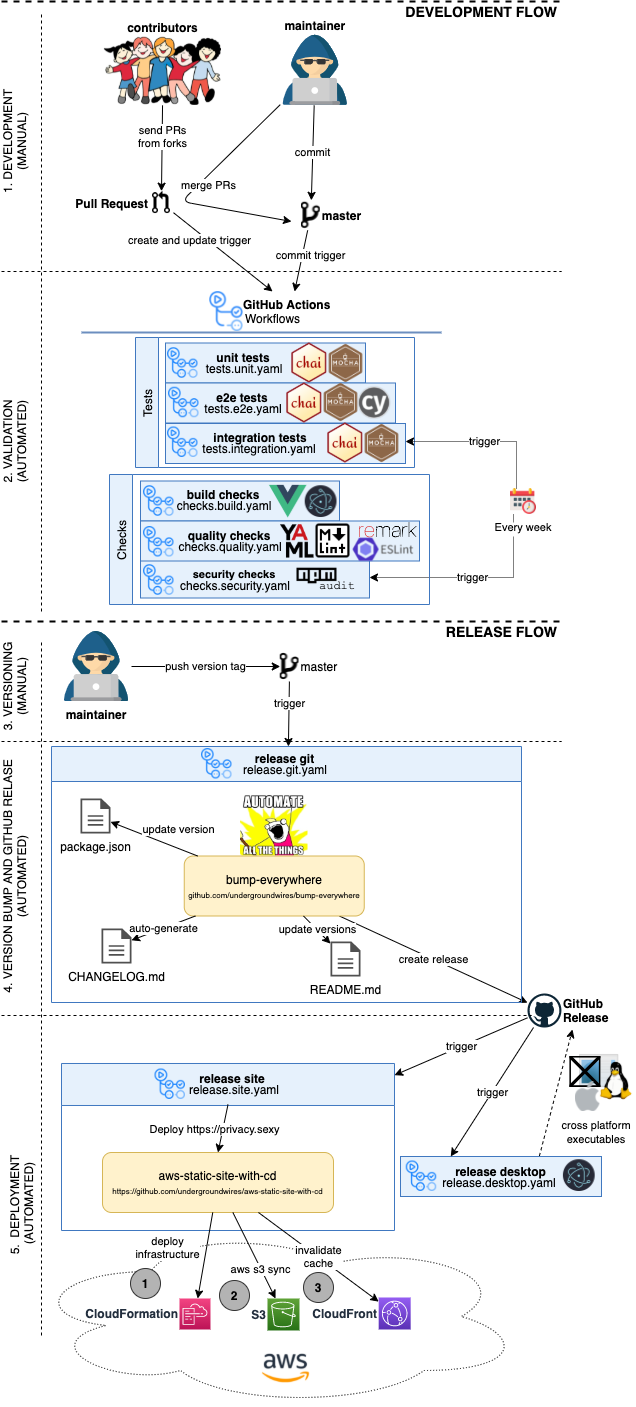
Pipeline files
privacy.sexy uses GitHub actions to define and run pipelines as code.
GitHub workflows i.e. pipelines exist in /.github/.workflows/ folder without any subfolders due to GitHub actions requirements 1 .
Pipeline types
We categorize pipelines into different categories. We use these names in convention when naming files and actions, see naming conventions.
The categories consist of:
tests: Different types of tests to verify functionality.checks: Other controls such as vulnerability scans or styling checks.release: Pipelines used for release of deployment such as building and testing.
Naming conventions
Convention for naming pipeline files: <type>.<name>.yaml.
type:
- Sub-folders do not work for GitHub workflows 1 so we use
<type>.prefix to organize them. - See also pipeline types for list of all usable types.
name:
- We name workflows using kebab-case.
- E.g. file name
tests.unit.yaml, pipeline file should set the naem as:name: unit-tests. - Kebab-case allows to have better URL references to them.
- README.md uses URL references to show status badges for actions.